YS-300 Series Digital Leather Softness Tester
Scope of Application
【Operating Instructions】
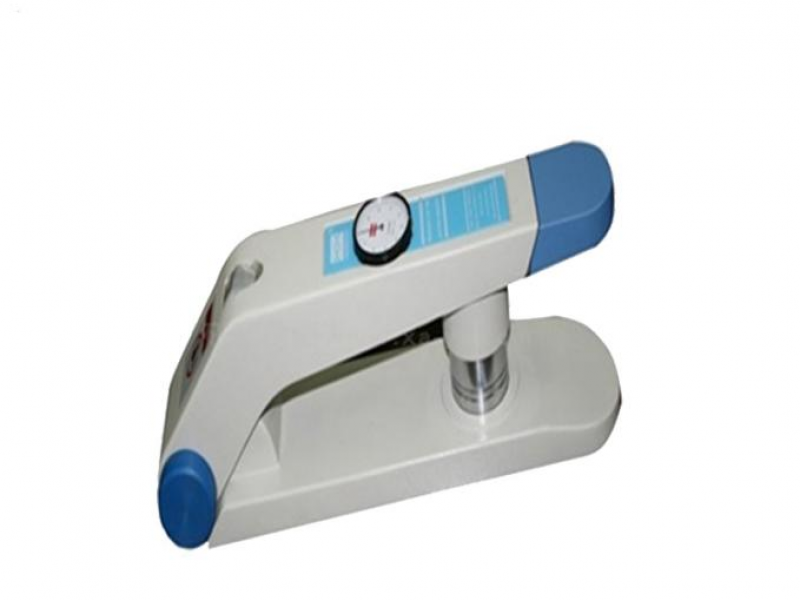
- The YS‑300 Leather Softness Tester was developed by the BLC Technology Centre in the UK. It is professionally designed for testing the softness of leather, coated fabrics in the textile industry, and other materials. The test material is clamped on a test fixture with a known aperture, then a probe applies a specified load onto the fabric, and the softness value is read from a dial gauge (or digital display). In the leather industry, this instrument is used to measure the softness of leather and hides, to check whether the softness of a batch of leather is uniform, or to evaluate softness variations across different parts of a single piece of leather.
**YS-300 Series Digital Leather Softness Tester**
**【Scope of Application】**
The YS‑300 Leather Softness Tester was developed by the BLC Technology Centre in the UK. It is professionally
designed for testing the softness of leather, coated fabrics in the textile industry, and other materials. The test
material is clamped on a test fixture with a known aperture, then a probe applies a specified load onto the fabric,
and the softness value is read from a dial gauge (or digital display). In the leather industry, this instrument is used to
measure the softness of leather and hides, to check whether the softness of a batch of leather is uniform, or to evaluate
softness variations across different parts of a single piece of leather.
**【Instrument Features】**
The YS‑300 Leather Softness Tester adopts an open‑frame sample placement mechanism that does not damage the leather
surface, and samples do not need to be cut from the leather before testing (non‑destructive testing). This is a unique highlight
of the instrument. It allows a reliable quality system to be established between suppliers and customers when leather softness
needs to be prioritized.
**YS‑300 Leather Softness Tester Product Configuration Options:**
- **Dial‑type softness tester** (scale accuracy 0.1 mm)
- **Digital softness tester** (optional computer control software for transferring test data to a computer; digital accuracy 0.01 mm / 0.0005″)
The digital model YS‑300D Leather Softness Tester has a USB port for connecting to a computer for data processing and storage, and
calibration can be reset to the original factory settings. For this purpose, MSA provides a unique software that allows users to connect the
ST300D directly to a PC and import instrument readings into applications such as spreadsheets, databases, Word, Notepad, etc. The
imported data can be further processed and analysed. If required, users need to set appropriate conditions on their own instrument (e.g.,
charts can be updated accurately in real time, and MS Excel can be used for calculations). MSA’s data software YS‑300 is easy to set up on
Windows systems. The YS‑300D and computer are connected in real time for data input. The software has a simple graphical user interface (GUI)
for convenient configuration and background operation. It automatically receives data from the instrument and forwards it to the selected application.
In addition, the YS‑300 is designed and equipped with a wireless device, allowing greater freedom of movement. It can provide test data from
anywhere, has a USB interface, can connect to up to 120 meters, and supports wireless transmission up to 200 m. The PC sends address codes
to the wireless module of each corresponding meter. Measurement transmission is initiated by pressing the start button on the meter module
or the meter itself. Special data coding between the computer and the wireless module ensures data security.
**Test Procedure**
**A) Zeroing Procedure**
1. Select the appropriate reducing ring from the available apertures: 35 mm, 25 mm, or 20 mm.
- **35 mm** – for stiff leather (e.g., shoe upper leather)
- **25 mm** – for medium‑soft leather (e.g., upholstery leather, soft shoe uppers)
- **20 mm** – for soft leather (e.g., light gloves, garment leather)
2. Open the tester and place the supplied metal ring into the circular hole.
3. Raise the probe and close the tester so that the metal disc presses tightly against the base of the presser foot.
4. Release the probe, allow the meter reading to stabilise gradually, and turn the dial until the pointer is at the “zero”
position. Open the tester and remove the metal ring.
Once the above zeroing is completed, it does not need to be repeated unless the reducing ring is changed or the instrument environment changes.
**B) Testing Method**
1. Place a leather specimen, as specified in IUP/2, flat on top of the reducing ring. The area over the aperture must be free from cuts
and obvious scars, and sufficiently large to be clamped well.
2. Raise the probe and close the tester to clamp the leather.
3. Release the probe, wait for the meter reading to stabilise, record the value. Open the tester and remove the leather specimen.
4. Repeat steps 5‑7 (referring to steps 2‑3 in this section) to test other positions specified in IUP/2.
5. Repeat steps 5‑8 (steps 2‑4) for other parts of the leather if required.
**【Technical Parameters】**
- **Load:** 530 ± 10 g (driven by a small pneumatic valve air bag)
- **Load pointer gauge:** Range 0.1 – 6.6 mm
- **Dimensions:** 12 × 49 × 16 cm
- **Weight:** 5.5 kg
**YS‑300 Leather Softness Tester Standard Accessories:**
- Zeroing plate, standard leather piece, 2 clamping rings
- Compliant standards: IULTCS, IUP/36, EN ISO 17235:2002
- Measurement range: 0.1 – 6.6 mm
- This instrument complies with the IULTCS IUP/36 standard. It features an attractive appearance, easy operation, convenient maintenance, and portability. It is specifically designed for testing the softness of leather and hides used in footwear, furniture, garments, etc., to check the uniformity of softness within a batch or the same package, or to inspect softness differences across various parts of a single piece of leather.
- Product specifications: ISO‑17235, IULTCS IUP/36
- Test diameters selectable: 35 mm, 25 mm, 20 mm
- Load: 530 ± 10 g or 500 g
- Gauge: 0.1 – 10 mm (actual measurement 0.1 – 7.6 mm)
- Dimensions: 14 × 49 × 18 cm
- Weight: 5 kg